Habilitar uma CDN para o seu Discourse

Portanto, você gostaria de usar uma CDN para acelerar o acesso mundial a ativos comuns no seu fórum Discourse? Você pode querer ir com tudo e Set up file and image uploads to S3 (veja também Configure an S3 compatible object storage provider for uploads).

Se você quer uma CDN sem a complexidade adicional do S3 e ter duas CDNs, este é o guia para você. A CDN reduzirá parte da carga no seu servidor, permitindo que a CDN sirva esses ativos para que o servidor não precise fazê-lo. Ela também pode acelerar as coisas ao entregar os arquivos de um local mais próximo do usuário final.

Cadastre-se na CDN de sua escolha – CDCK/discourse.org usou e recomenda fortemente a Fastly.

A configuração será algo como isto:
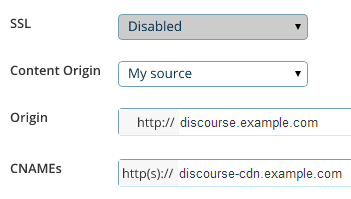
O que você está procurando são três configurações principais:

  1. O endereço de origem (origin address), que é o URL onde seu fórum está atualmente localizado discourse.example.com. É daqui que a CDN buscará todo o seu conteúdo original na primeira solicitação.

  2. O CNAME, que é o nome “amigável” para sua CDN que você configurará no seu DNS, por exemplo, discourse-cdn.example.com

  3. O URL da CDN (CDN URL), que é o nome “não amigável” de onde os ativos da CDN em cache virão através da rede mundial de servidores distribuídos da CDN. Será algo como 637763234.cdn-provider.com

Você precisará editar seu DNS para mapear o CNAME para o URL da CDN, assim:

discourse-cdn.example.com IN CNAME 637763234.cdn-provider.com

(Depois de editar o DNS, dê um tempinho para propagar.)

A parte real da configuração no Discourse é bem simples. Descomente a linha da CDN no seu app.yml e atualize-a com o CNAME que você acabou de configurar no seu DNS:

## O endereço http ou https da CDN para esta instância do Discourse (configurado para puxar)
DISCOURSE_CDN_URL: https://discourse-cdn.example.com

:warning: O URL da CDN deve incluir um protocolo (https:// ou http://). URLs relativos ao protocolo (começando com //) não são mais suportados e farão com que a compilação do contêiner seja abortada.

(Se você não vir esta linha no seu app.yml, adicione-a abaixo das outras variáveis DISCOURSE_)

Como em qualquer outra alteração no seu app.yml, você precisa reconstruir o contêiner para refletir as alterações:

./launcher rebuild app

Depois de reconstruir, navegue até sua instância do Discourse no navegador. Visualize a fonte e procure por “cdn”. Você verá que os ativos dos sites agora estão vindo da sua CDN:

<script src="https://discourse-cdn.codinghorror.com/assets/preload_store-4ea79c2f435becca86ac97a9c038f9c7.js"></script>
<script src="https://discourse-cdn.codinghorror.com/assets/locales/en-7084a68855205a9128245d2d0ce94ed9.js"></script>

Este tópico cobre o cenário mais comum de aceleração de ativos estáticos. Veja este tópico para aceleração CDN de todo o site (ativos dinâmicos e estáticos) (como a fornecida pelo Cloudflare). O Cloudflare funciona de forma diferente de uma CDN tradicional, então este não é um bom tópico para discutir o Cloudflare.

Outras CDNs reportadas como funcionais incluem:

43 curtidas

I’m sorry guys, I’m trying to figure out how to do this, and I’m drawing a blank. I’ve tried to follow your instructions, but I think the Fastly site must have changed since you created the screenshot, because I can’t find where to enter in the details you’ve presented.

:confused: :confounded:

Minor update - this is the screen I get when I trying to use the service

It doesn’t match up with your example, so I don’t know what goes where.

Fastly is more sophisticated than the general CDN it supports accelerating both dynamic and static content.

To configure.

  1. Plug in the IP address of your Discourse web server in “Server Address”
  2. Plug in your desired domain name in “Domain name”
  3. Point your DNS CNAME for your domain at global.prod.fastly.net per: http://docs.fastly.com/guides/getting-started/cname-instructions-for-most-providers

That is it you should be done, no changes needed on Discourse side.

7 curtidas

I wonder how to deal with CDN provider does not support https…

There is a cloud storage provider can just acted as CDN. But their spider don’t like SSL. There are APIs for upload assets. I would think the easiest way is to write a plugin to monitor public folder and upload them instantly…

That sounds like a push CDN to me, which was supported in the past but not currently.

This should also work with other CDNs? Like S3?

S3 is not a CDN, but it should work with Amazon CloudFront and any other Pull compatible CDN.

5 curtidas

If you want an inexpensive CDN, I think MaxCDN might be what you’re looking for. It is a pull-compatible CDN.

However, going to Fastly’s website from a quick google search led me to Fastly’s pricing page in a snap.

MaxCDN goes by a somewhat different pay model (as far as I can see in comparing with Fastly) which is easier to budget with.

1 curtida

I’m new to Discourse and I’ve been trying to configure it with Cloudflare. This tutorial focuses on fastly. I have used Cloudflare on my Wordpress sites in the past and it was quite simple. Typically, Cloudflare scans your website and all you have to do is change your DNS to what Cloudflare provides. My question is… do the same steps I just mentioned apply to discourse? If yes… what so I do with the CDN URL in app.yml? Thanks guys.

1 curtida

You do not have to spend time designating which files to cache. CloudFlare’s technology builds the cache for you based on your traffic and what objects on your site are safe to serve from the edge.

Just be sure you do not enable any JavaScript weirdness / modifications in CloudFlare, as it will break the crap out of Discourse if you do.

8 curtidas

Anyone have any experience with Cachefly?

They’re running a pay-as-you-go plan with no minimum spend, which seems to be the only one of their peers, since Fastly has a minimum $50/mo spend requirement. https://www.cachefly.com/plans-pricing/pay-as-you-go-cdn/

I’ve heard their name often before and I think they’re up there in the top tier CDN? Just checking others’ experience first…

Cachefly are good, have never used them but heard plenty good things

2 curtidas

Does anyone have any experience in using KeyCDN with Discourse?

They support HTTP/2, have 22 PoPs, and are amongst the cheapest CDN on the market (starting $0.04/GB). If all works well with Discourse it would definitely be something worth looking into.

Yes, I using KeyCDN on my discourse: http://reactvn.org/. It’s working perfectly.

These are the steps to use KEYCDN:

  1. Register [KEYCDN] 1 account: Fill in your e-mail can register, you can using without having to recharge.

  2. Create a pull zone: https://www.keycdn.com/support/create-a-pull-zone/

  3. Create a Zonealias: https://www.keycdn.com/support/create-a-zonealias/

  4. Config Discourse: Modify app.yml, DISCOURSE_CDN_URL point to your CDN URL or an alias. Enable a CDN for your Discourse

7 curtidas

Any one knows how to configure with http://www.coralcdn.org/ ?

Is there any way to change the CDN url without having to rebuild the Docker container or is updating the app.yml and rebuilding currently the only way?

No, that is the only way.

1 curtida

Why not use CloudFlare? They don’t charge for bandwidth at all. (Plus a bunch of other features, like free SSL).

3 curtidas

You can use Cloudflare along with another CDN. You don’t get full CDN advantages with Cloudflare unless you pay, and for serving up lots of images, attachments, or other media you’ll want a dedicated CDN to reduce the server load.

after enable CDN, i can not visit my site any more.

I have this error in my log:

nginx: [emerg] host not found in upstream "avatars.discourse.org" in /etc/nginx/conf.d/discourse.conf:247